Push code. Ship the build you tested.
Deploy from GitHub or straight from your terminal. Dokwe builds your app, runs it on staging with HTTPS, and promotes that exact build to production when you say so.
$ curl -sSL https://dokwe.com/install-cli.sh | bash
$ dokwe login
$ dokwe create my-app
? GitHub repo URL (blank for CLI deploy): ⏎
$ dokwe deploy
→ Pushing to Dokwe git, no GitHub needed
→ Building, streaming the log…
✓ Live on staging:
  https://my-app-staging-app.dokwe.com

# follow the running app
$ dokwe logs
Bring the app you already have.
Dokwe looks at your repo and works out how to build it. If you have a Dockerfile, it uses yours.
Next.js, Nuxt, NestJS, single-page apps and plain Node servers.
FastAPI, Django and Flask, from requirements.txt or pyproject.toml.
Laravel apps and plain PHP sites, detected from composer.json.
Go modules, Ruby apps and static HTML sites.
Live in three steps.
Create the project
Connect a GitHub repo and branch in the dashboard, or run dokwe create in your folder. Every project gets Staging and Production.
Push
A push to your branch builds into Staging. No GitHub? dokwe deploy pushes your folder to Dokwe's own git server.
dokwe deploy
Promote
Check staging on its own HTTPS address, then promote. Production runs the same image staging built, with production's variables and domains.
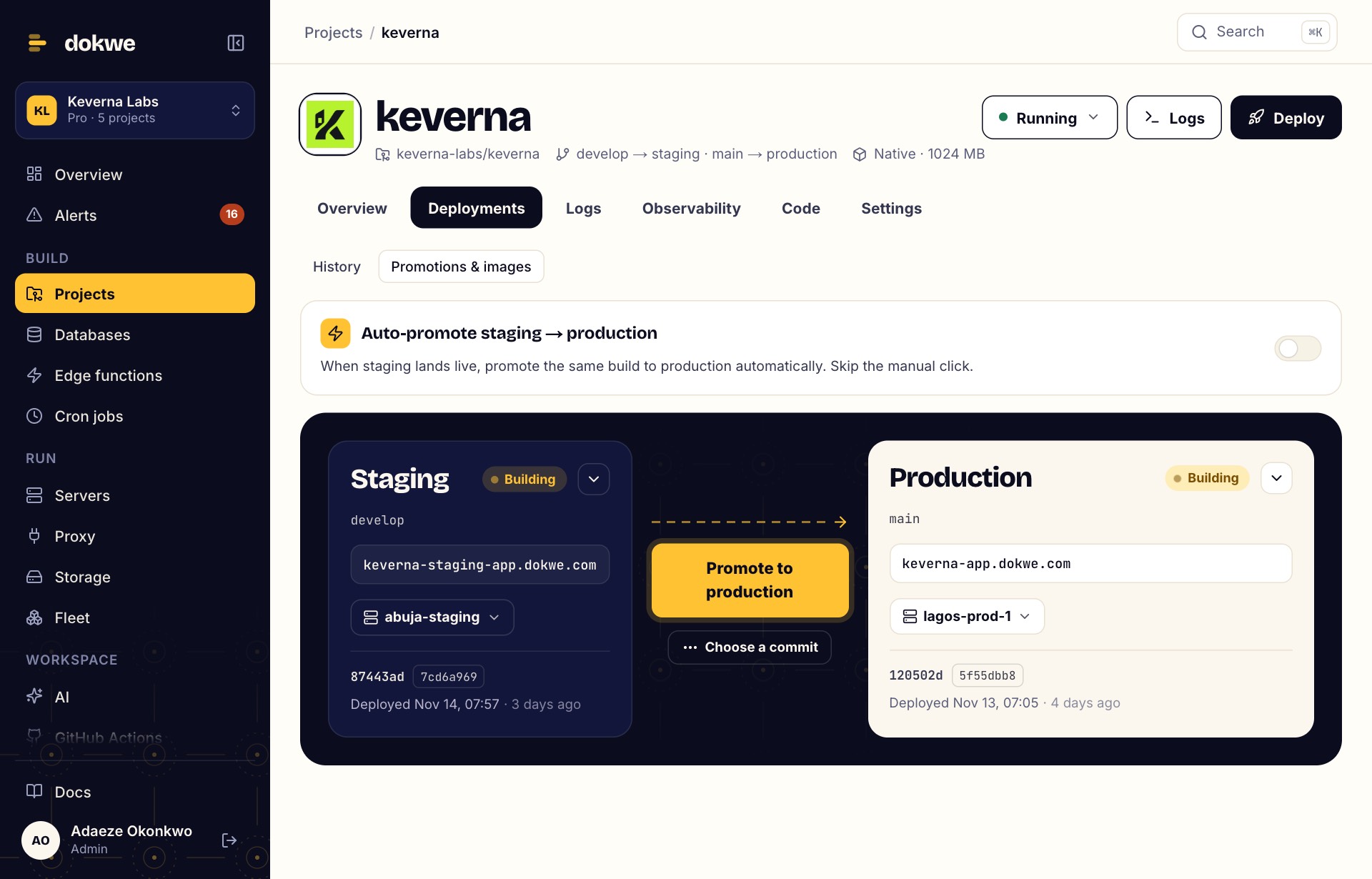
Production only changes when you promote.
Two environments from day one
Staging follows your branch. Production has no branch: it only changes by promotion.
The build you tested, not a rebuild
Promotion reuses the image staging built. Pick an older commit, or turn on auto-promote.
No gap when production is running
The new container starts beside the old one, has to answer before it takes traffic, then the old one stops.
Signed GitHub pushes only
Every webhook is checked against its signature. Tags and other branches are ignored, and you can pause auto-deploy.
Encrypted variables
Environment variables are stored encrypted with AES-256-GCM, per environment.
Go back to an earlier deploy
Pick an earlier deployment in the dashboard or run dokwe rollback. Native apps switch back without a rebuild.
No Dockerfile? No problem.
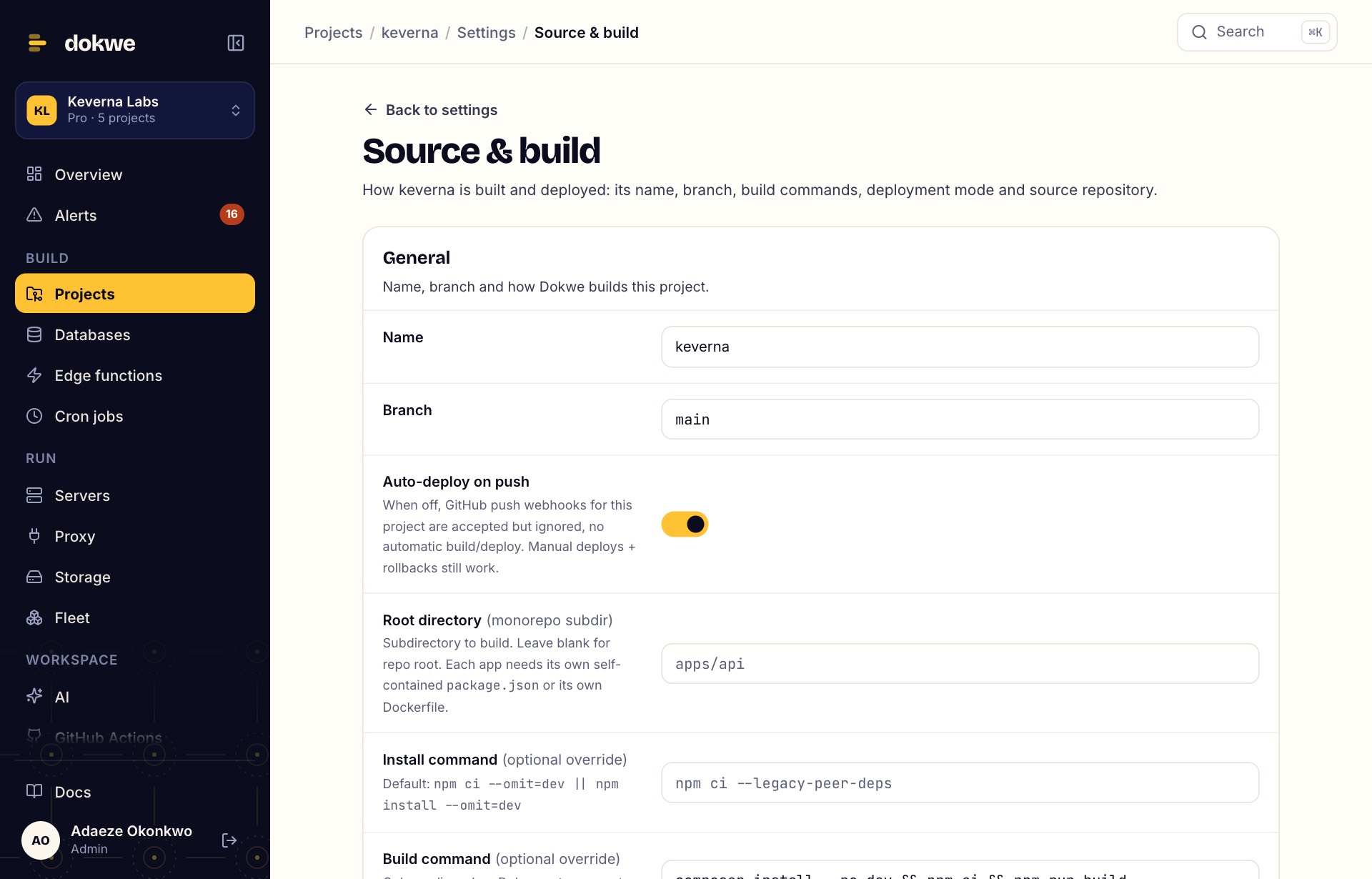
Dokwe detects your framework and writes the build for you. Override any part of it in Source & build.
- Root directory for monorepos
- Your own install and build commands
- Your own
Dockerfile, from the repo or saved in the dashboard - Cancel a running build at any time
Your domain, with HTTPS, in a few minutes.
Every environment gets a dokwe.com address. Add your own domain with one TXT record to prove it's yours and a CNAME to point it at Dokwe.
$ dokwe env set API_KEY=…
$ dokwe domains add app.example.com
→ Add these records where your domain is managed:
   TXT    _dokwe-verify.app.example.com
   CNAME  app.example.com
$ dokwe rollback <deployment-id>
Good questions, straight answers.
Do I need GitHub?
No. dokwe create then dokwe deploy pushes your folder to Dokwe's built-in git server and builds it. You can connect GitHub later for deploy on push.
What happens when I push to GitHub?
Dokwe checks the webhook signature, finds the project for that repo and branch, and builds the commit into Staging. Tag pushes and other branches are ignored.
How does production get updated?
By promotion. Dokwe starts the image staging already built, with production's variables and domains. If production is running, the new container must answer before it takes traffic.
Do I need a Dockerfile?
No. Dokwe detects Node (Next.js, Nuxt, NestJS, single-page apps), Python (FastAPI, Django, Flask), Go, Ruby, PHP and Laravel, and static HTML. If you have a Dockerfile, Dokwe uses it.
How do I roll back?
Pick an earlier deployment in the dashboard or run dokwe rollback <deployment-id>. To put an older build on production, promote it with the commit picker.
Can I deploy to my own servers?
Yes. Pick one of your connected servers as an environment's deployment target, and add replicas on other servers.
Your next deploy could be live in minutes.
Install the CLI, run dokwe deploy, open your staging URL.